
A different kind of container engine
Containers with no daemon, stored file by file
One static binary runs your Docker and OCI images. When no container runs, nothing runs. A file that many images share is stored once and read into memory once.
- 4.1 msto start a container
- 0processes when no container runs
- −67%memory for file cache
- −70%disk for the same images
An example: install podbag with the install script, run a container that prints hello, then see that no podbag process is left running.
Features
Light where other engines are heavy.
docker CLI, Compose and buildx.What stays running
Three containers start, then stop. Watch the processes on the machine.
Docker Engine
a client and two daemons
With no containers: 203 MiB
podbag
one program, no daemon
With no containers: nothing runs
Files, not layers
Other engines store images as layers. podbag stores them as files.
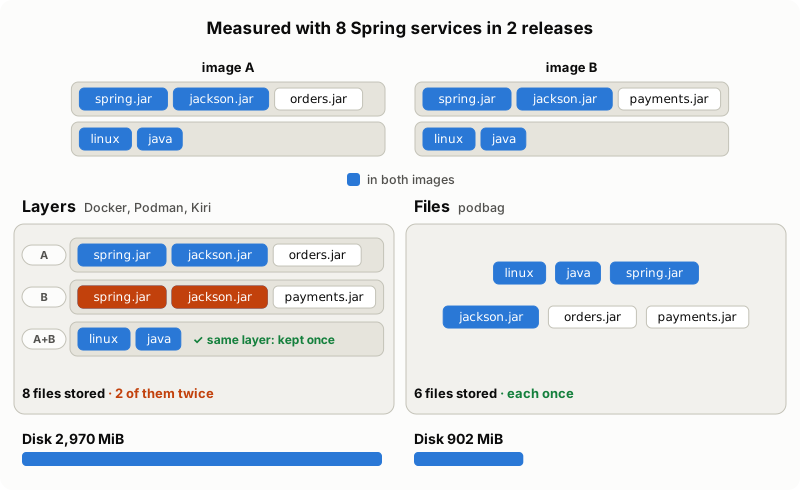
- A layer store (Docker, Podman, Kiri) keeps a layer once only when the whole layer is the same. If one file differs, the whole layer is stored again, with the files it shares with other layers.
- podbag keeps each file once. An image is a list of paths that point to the files.
- For 8 Spring services in 2 releases: 902 MiB on disk against Docker's 2,970 MiB.
Stored once, cached once
When containers read the same file, the kernel keeps one copy of it in memory. With layers, the same file in two layers is two files, so it is read into memory twice. Starting 16 Spring services read this much into memory:
Install
Install script (Linux and macOS)
curl -fsSL https://raw.githubusercontent.com/SteelCrab/podbag/main/install.sh | sh- Downloads the file for your system and checks its SHA-256 sum.
- Installs it in
/usr/local/bin, withsudowhen needed. - On Ubuntu 24.04 and later, adds the AppArmor profile that rootless containers need.
Download
Get a file from the latest release, and check it with SHA256SUMS.
| System | File |
|---|---|
| Linux, x86_64 | podbag-x86_64-linux |
| Linux, arm64 | podbag-aarch64-linux |
| macOS, Apple silicon | podbag-aarch64-macos |
| Windows, x86_64 (experimental) | podbag-x86_64-windows.exe |
| Windows, arm64 (experimental) | podbag-aarch64-windows.exe |
Windows needs WSL 2. Run wsl --install once.
Cargo (Linux)
cargo install podbagBuild from source
See docs/build.md for Linux, macOS and Windows.
Use
podbag run --rm alpine echo hello                 # pull the image if needed, run, remove
podbag run -d --name web -p 8080:80 nginx:alpine  # run in the background
podbag ps                                         # list containers
podbag logs -f web                                # follow the logs
podbag exec -it web sh                            # open a shell in the container
podbag stop web && podbag rm web # stop and removeWith the docker CLI, Compose and buildx
podbag system service &      # Linux (on macOS: podbag vm start)
export DOCKER_HOST=unix://$XDG_RUNTIME_DIR/podbag/docker.sock
docker compose up -dBenchmarks
Medians on one Linux VM (4 CPUs, 3.8 GiB, arm64) with podbag 0.1.0, Podman 5.7.0, Docker 29.1.3 and Kiri 0.2.1. Lower is better.
All numbers and how they were measured: benchmarks and the Spring microservices benchmark.
Compared with other tools
| podbag | Docker | OrbStack | Colima | Kiri | |
|---|---|---|---|---|---|
| Runs on | Linux, macOS, Windows¹ | Linux; macOS and Windows with Docker Desktop | macOS | macOS, Linux | Linux, macOS, Windows |
| Runs in the background | nothing once the last container ends (Mac: a 2 MiB standby) | dockerd, containerd, a shim per container | a Linux VM with Docker Engine | a Lima VM with Docker or containerd | a daemon; on macOS and Windows a small VM |
| Image storage | files, each kept once | layers | layers | layers | layers, unpacked when first used |
Mac: docker run start, median² | 14.4 ms | 97.4 ms | 90.4 ms | 73.6 ms | 11.8 ms |
| Mac: memory 6 minutes after the last container² | 1.7 MiB | 950 MiB | 795 MiB | 1.54 GiB | 12 MiB |
| License | Apache-2.0 | Apache-2.0; Docker Desktop is paid for larger companies | proprietary | MIT | Apache-2.0 |
¹ Experimental. ² Measured on one Mac, with Docker Desktop for Docker.

The intro, in 26 seconds
Documentation
- Usage: commands, volumes, networks, limits, Docker API, macOS, Windows.
- Architecture: how podbag differs from Docker, and where it is still behind.
- Build from source: Linux, macOS, Windows.
- Contributing: tests, pull requests, translations.
Read the README for a short start.